Google Business Profile SEO Checklist: What to Optimize
Most businesses fill out their Google Business Profile once, then just forget about it. And yeah, that’s a mistake. Your profile isn’t some one time form. It’s more like a living listing that Google keeps rechecking for accuracy, momentum and trust.
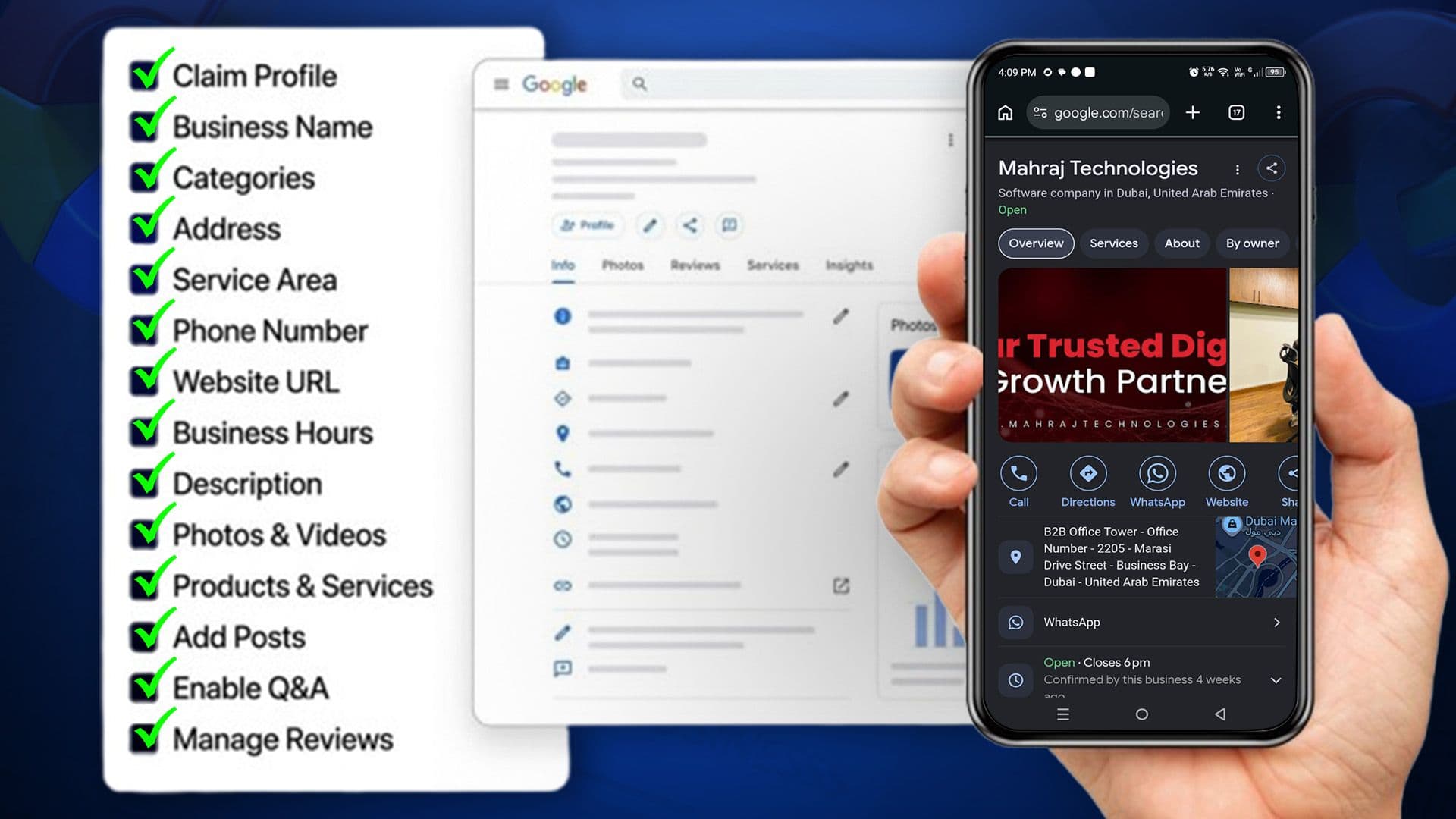
One small missing detail, an outdated photo, or several weeks of no updates can quietly cost you a lot of visibility in the map pack.
This Google Business Profile SEO checklist shows you what to optimize and in what order. It helps ensure you don’t miss the factors that matter most.
Key Takeaways
- Make sure your Google Business Profile is complete, accurate, and current, like don’t leave anything half done.
- Pick the correct categories, attributes, and descriptions. This helps your business show up in searches more, in a stronger, more relevant way.
- Keep adding and swapping photos, and also keep posting updates plus asking people for reviews, so it looks active and dependable.
- Google’s removal of Q&A means AI can use your profile details directly.
- Maintain consistent business information across online directories.
- Review your profile regularly to catch errors and protect your local visibility.
Why Google Business Profile SEO Matters?
Google Business Profile listings often appear ahead of websites in local searches. It’s basically what people see first in local search and on Google Maps too. It really shapes whether they call you, stop by, or just scroll past.
Local rankings kinda hinge on relevance, distance and prominence, and if your profile is optimized the right way, it supports all those ideas at once.
But if your listing is weak, or just a bit incomplete, it tends to lose to competitors who have already been putting in the work for a while.
Key Elements to Optimize on Your Google Business Profile
This Google Business Profile SEO checklist covers every section Google actually evaluates. Work through it in order, since some fields depend on others being set up correctly first, such as categories affecting which attributes appear.
1. Business Name, Address & Phone Consistency
Your name, address, and phone number should match exactly. Keep all of that the same across your website, directories, citation places, and social profiles too.
Small details like “St.” vs. “Street” or a missing suite number can confuse Google. These inconsistencies may weaken your local ranking signals.
Why It Matters
Google will cross check your NAP details against other places where your business is mentioned online. If there are conflicting details, it becomes harder for Google to verify your business, like it can’t pin things down properly.
This can quietly drag down rankings, even if the rest of your profile is still pretty well optimized.
How to Optimize It
- Try to keep your NAP format totally the same, like exactly, across your website footer, your GBP listing, and all those directories such as Yelp or Facebook.
- Also update any older citations whenever you relocate, or if your phone number changes, because mismatches happen faster than you think.
- And don’t use tracking numbers or call forwarding setups if they don’t match the number you already publish.
- Finally, do a regular citation check, using something like BrightLocal or Moz Local, so you can spot differences early before they turn into a bigger mess.
2. Choose the Right Primary and Secondary Categories
Categories are one of the single highest impact sections on your whole profile. Google has roughly 4,000 categories, and you can choose one main category, plus you can add up to nine other secondary categories.
Why It Matters
Your primary category is the strongest signal. Google uses it to figure out what searches you’re eligible to show up for, basically.
Secondary categories then extend that reach to nearby related searches too without really messing up your core relevance or diluting it.
How to Optimize It
- Pick the single most specific primary category you can find. Like, if you do pizza, then “Pizza Restaurant” usually beats a vague “Restaurant” for those pizza searches.
- Next, add only 2 to 4 secondary categories that actually fit what you do, not random ones just because they seem relevant. Stay away from category stuffing, ok?
- Also, take a look at what your top three competitors are picking, then try to match their specificity, or go one step higher if possible.
- And you should recheck your categories every few months, because Google keeps rolling out newer, more exact options.
Pro Tip:
Using unrelated categories can trigger quality reviews or hurt rankings. Stick to categories that accurately reflect the services you actually provide.
3. Write a Keyword Optimized Business Description
You get 750 characters to talk about your business, like what you do and who you serve. Use that space, not too much, just enough to say where you operate and who it’s for. Also explain in plain terms what you offer.
Why It Matters
Even if the description gets a bit less ranking weight than the categories, it still matters. Because it helps Google and AI driven summaries grasp the whole business context, and honestly, it’s usually the first thing a possible customer sees.
How to Optimize It
- Start by explaining what your business does and who you serve, then add your service area naturally.
- Try to make sure you use your core service keywords one or two times, not so much that it gets annoying or repetitive.
- Also don’t drift into those promotional lines, like discount codes, or anything along the lines of “best in town.”
- Instead, keep it oriented around the customer, and speak to what people usually type into search bars.
4. Add Accurate Business Hours
This sounds basic, but those outdated hours are one of the most common reasons customers start losing trust in a listing, sort of.
Even if the place is good, people get that little “wait, what” feeling when the hours are wrong or out of date.
Why It Matters
Google factors your profile accuracy into how much it basically trusts your listing overall. Also, wrong hours hit conversions very directly, because someone who arrives and the business is closed doesn’t tend to come back again.
How to Optimize It
- Set your regular weekly hours and keep them current if they change seasonally.
- Add special hours for holidays at least a few weeks in advance.
- Turn on "more hours" for specific categories like delivery, pickup, or drive-through if relevant.
- Check your hours quarterly, since staff changes or seasonal shifts often go unrecorded.
5. Select the Correct Service Areas
If you run a service area business without a public storefront, your service area helps define where you can appear in local search. It tells Google which areas you serve and where you can reach customers.
Why It Matters
Only list areas where you actually provide services. Unrelated locations can dilute relevance and confuse Google about your service area. This may reduce your visibility, even in the areas you genuinely serve.
How to Optimize It
- List only the places you genuinely and reliably serve, like cities, towns, or even zip codes.
- Google lets you list up to 20 service areas, but don’t do that whole max out thing. It means staying within a realistic radius from your business location instead.
- If you serve one place super well compared with the others, think about a dedicated location page for that city on your site, so it actually lands better.
6. Add High Quality Photos and Videos
Photos are one of the fastest ways to build some trust with a person when they are just scanning search results real quick. It makes things feel more immediate and a little more real before they even click.
Why It Matters
Profiles that show strong, real visuals get more clicks, more direction requests, and more calls. Businesses that use professional, well lit pictures usually end up with notably higher engagement than the ones using darker, squeezed, or stretched photos.
How to Optimize It
- Logo: Choose a square logo, 720×720px or larger.
- Cover Photo: Add a 16:9 image around 1024×576px, featuring your storefront, team, or main product.
- For Post & Product Photos: Use 1200×900px (4:3) to minimize awkward cropping.
- Also include interior, exterior and team before and after photos, not just one angle.
- Upload genuine business photos rather than stock, heavily filtered, or text heavy images.
- Keep videos within 30 seconds and under 75 MB.
7.Optimize Products and Services Listings
This section lets you list exactly what you sell, like names, details, and prices, if you choose to add them.
Why It Matters
A detailed products and services list can improve your visibility in the Map Pack. It helps Google match your listing with specific, high intent searches. Like, use “emergency water heater installation” instead of just “plumber.”
How to Optimize It
- List each service one by one instead of bundling them together into some vague bundle.
- Use the exact terms people actually type in when searching, not the internal words.
- Keep each description short and straightforward, adding accurate pricing whenever available.
- Review the full section quarterly to update offerings, remove outdated services, and add new ones.
8. Use Google Posts Regularly
Google Business Profile posts add fresh content to your listing. They can help customers discover important updates directly from your profile.
Why It Matters
Regular posting signals to Google that your business is active and overall well managed. It also gives you an easy, ongoing way to slide in relevant keywords into your profile, without forcing them in other places or keyword stuffing.
How to Optimize It
- Keep your profile active with weekly offers, events, updates, or tips.
- Upload 1200×900px images for sharper visuals and fewer cropping issues.
- Also, add a direct CTA, such as “Book Now” or “Call Today.”
- Plan posts with a content calendar to avoid gaps during busy weeks.
9. Add Business Attributes
Attributes are the small checkboxes and tags that describe specific traits of your business.
Why It Matters
Google's local filters and AI-generated summaries rely heavily on these fields when matching your business to specific searches, like "wheelchair accessible restaurant near me." They also build trust with customers scanning your profile.
How to Optimize It
- Complete every attribute that genuinely applies, such as accessibility, ownership identity, or service options.
- Recheck this section periodically, since Google adds new attributes over time.
- Only select attributes that are accurate; misrepresenting your business here can lead to customer complaints and profile flags.
10. Enable Messaging and Q&A
This is one area where the advice has changed significantly, and a lot of older checklists still get it wrong.
Current Status
Native Google Business Messages ended mid 2024. Whether chatting is even there now, it depends on a few things, like your business category, where you are located, and also how your account history looks in general.
In late 2025, Google phased out the public Q&A and they replaced it with Ask Maps. That one basically produces answers from your business profile, plus reviews, and even whatever is on your website.
What to Do Instead
- Check your GBP dashboard to confirm messaging availability.
- If available, respond quickly to messages and avoid leaving them unanswered.
- As Q&A no longer supports new content, make sure your categories, attributes, services, hours, and reviews stay accurate for AI.
- Add a clear contact or quote page on your website as a reliable fallback, regardless of what's happening with messaging that month.
11. Collect and Respond to Reviews
Reviews still sit among the top three local ranking factors, like alongside relevance and distance, basically. This is one of those things that just stays around.
Why It Matters
Volume, recency, and your response rate all sort of steer how Google weighs your reviews.
A steady stream of new feedback tells the search engine that you’re an active, dependable business, way more than a big pile of ratings collected once and then never revisited.
How to Optimize It
- Send review requests after each completed service or purchase via SMS, email, or QR code.
- Keep reviews coming regularly instead of collecting them in bulk.
- Respond to all reviews within 48 hours and address negative feedback professionally.
- Do not offer discounts for reviews or use fake reviews.
12. Add a Website Link and UTM Tracking
Your profile's website link is a direct bridge between your Google listing and your site's conversion path.
Why It Matters
Sending traffic to the right page and measuring it turns your profile from this static listing into a trackable marketing channel, which is more real than it sounds.
How to Optimize It
- Connect your profile to the most relevant service or location page.
- Make sure the page matches the search intent, such as directing “emergency plumber” searches to a dedicated emergency page.
- Add UTM tracking to distinguish GBP visitors from other website traffic.
- Design the landing page around one key action, such as making a call or booking.
13. Verify and Update Business Status Regularly
Your Google Business Profile needs more than an initial setup. Regular checks and updates help keep it competitive and trustworthy.
Why It Matters
Google's local ranking appears to place growing weight on active engagement, like post frequency and review response speed, and comparatively less on static, unchanging profile history.
A profile that looks abandoned loses ground to competitors who update theirs consistently.
How to Optimize It
- Check for new reviews and questions weekly.
- Do a full audit of your key info, like the hours, categories, and photos, once a month.
- Always show the correct business status, including temporary or permanent closures.
- Verify your information, complete missing details, and post regularly to stay active.
- Collect and respond to reviews, track insights, and keep optimizing.
Common Google Business Profile SEO Mistakes to Avoid
Small errors can undo months of optimization work. Watch out for these common mistakes.
- Using inconsistent NAP details across platforms.
- Choosing broad or incorrect categories.
- Leaving photos outdated or low quality.
- Ignoring reviews, especially negative ones.
- Relying on old advice about messaging or Q&A features that no longer exist.
- Going weeks or months without a single post or update is a mistake.
Tools to Track Google Business Profile Performance
These tools help you track local rankings, reviews, listings, and GBP visibility.
- Google Business Profile Performance
- BrightLocal
- Whitespark
- Semrush Local
- Moz Local
- Local Falcon
How Often Should You Update Your Google Business Profile?
Treat your profile like an active channel, not some static listing. Keep an eye out for new reviews and new questions about it, like at least once a week.
Make sure you post at least once a week too, and then do a full audit of your business details, the hours, and the photos every month.
Honestly, profiles that keep up a steady pace of activity usually hang onto their local rankings better, compared to ones that are left untouched for long stretches.
Conclusion
Optimizing your Google Business Profile isn’t really a one time task, it’s an ongoing type of system.
Like every part in this Google Business Profile SEO checklist, from categories to those customer reviews to doing regular updates, it all matters for how well seen your business becomes.
The businesses that use their profile as an active promotion channel always win over the ones who just set it up once and then forget it. Start with the basics, keep it steady, and your local visibility tends to follow along.

Usama Shareef
Usama Shareef is the COO of Mahraj Technologies, bringing strong expertise in SEO content writing, software QA, and development testing. He specializes in delivering high-quality digital solutions with a focus on performance, accuracy, and scalable growth